Bug: Availability slots default to the wrong duration, even though a duration is already set in the event.
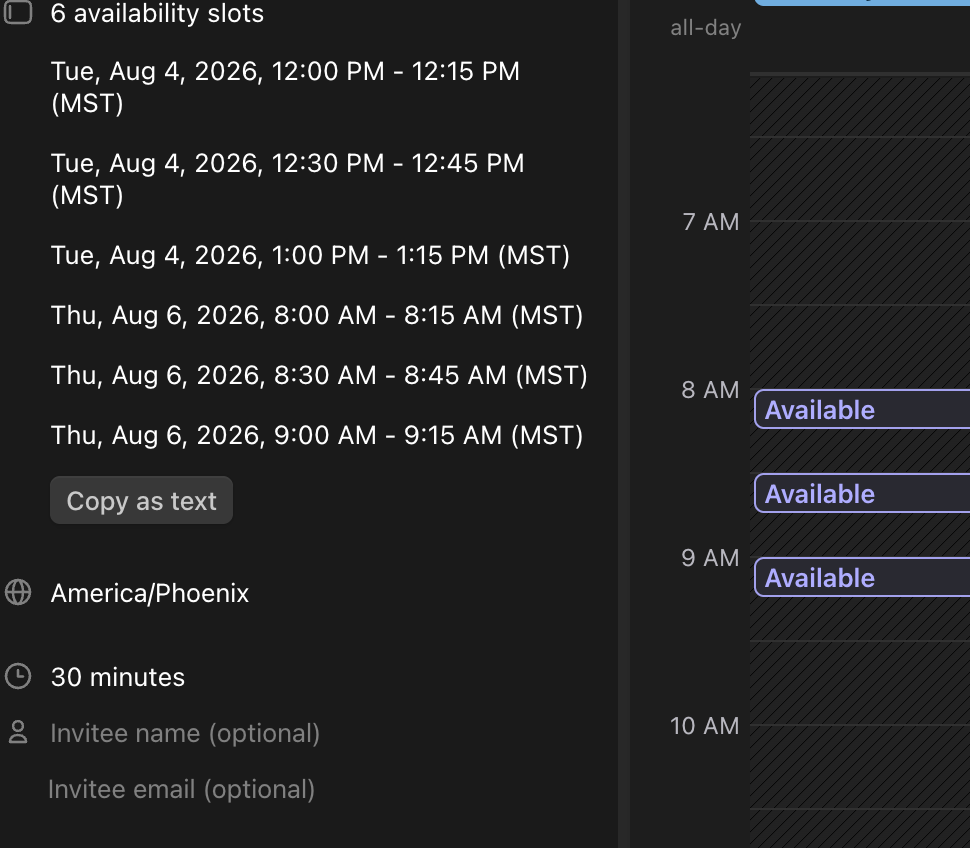
When making an open invite, I'm clicking on the calendar to choose the different availability slots. Even though the default duration for the event is already set and predefined to 30 minutes, as I click on a new slot, it's choosing 15-minute time options instead of 30 minutes.
I would expect that as I click for a different availability slot, it would default to the duration that is already set on this open invite that I'm creating. I don't want to have to go back and re-adjust the duration of each availability slot when it was already pre-configured in the duration. That doesn't make any sense to need to do all that extra effort.
Also because it displays this way, I have no confidence in whether the tool is going to work correctly or not. Will this create a 30 min or 15 min event once everything is done?
Log in to comment and vote
Comments1
Morgen Product Team
Aug 6
Hi Willard,
I see a misunderstanding here. On the calendar, you select your availability windows, not the precise slot starting times. For example, for a meeting of 30 minutes, you can draw larger windows on your calendar (eg. 8AM to 12PM), and Morgen will automatically offer the customer multiple slots of 30 minutes within that window (8AM, 8:30AM, 9AM, etc.).
In fact, if your meeting is 30 minutes and you only select availability windows of 15 minutes, no available slots will be shown at all because 30 minutes do not fit in any of those!