Fix duplicate Task ID
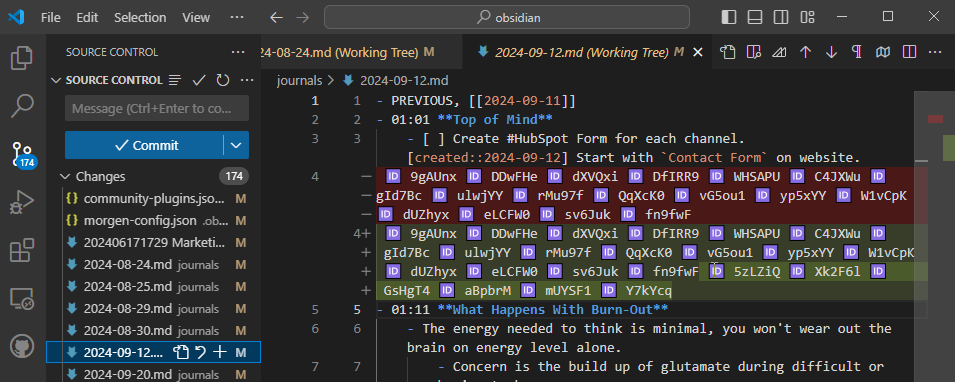
If a task already has an ID, please don't add another. Read that ID. Right now Morgen is appending additional IDs to tasks that already have them.
I don't know whether to delete the old ones or new ones. I Find them by committing my Obsidian vault. Then I open Morgen and sync.
A bunch of new task IDs show up. I hand edit to remove some when they show up around where I'm working. But it's difficult to keep up.
Log in to comment and vote
Comments8
Oct 20, 2024
Danny Hatcher (Customer Support)
Oct 20, 2024
Hello Justin is this still an issue or can I complete this request?
Mohammad
Oct 9, 2024
This was a bug and I believe it was fixed on version 3.5.9
Could you verify that you are using the latest version of morgen ?
Justin
Oct 21, 2024
Mohammad While it didn't notice the
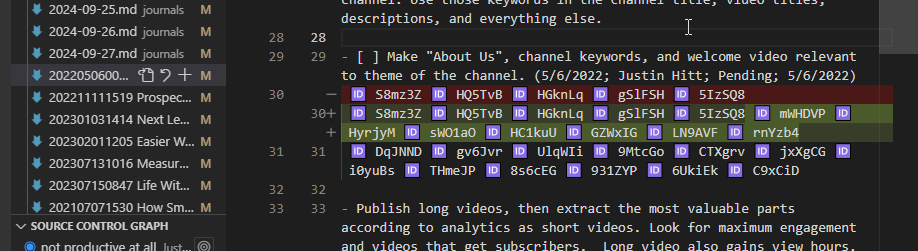
[id: abcxyz]that already existed, it created a single Id on each task. For most of the tasks it went well. Except a few like the image below.If I close Morgen then reopen it gets worse. Mind you, I don't have Obsidian open. I'm looking at this in vscode. One ID was added where an id already existed, where an id didn't, I get duplicates.
Justin
Oct 21, 2024
If I close and reopen the application it adds more tasks. It seems it doesn't recognize that an ID already exists, but sometimes it adds multiple.
I did the latest version. I still haven't opened Obsidian. It also seems to add ids beyond the 30 day window from the settings attached.